


PawPrint.net Forum
Thread #905
 by: robnpaul November 4th, 2009 |
i have tried every sync in it cannot get it to sync anymore. please help!
it used to sync now it does not and i don´t know how to put in the url . i was using washington but now that doesn´t work either. can anyone tell me how to fix it? I also do not know th url to the Washington big ben that used to work so well.
the ones in list now seem to have changed when i updated and they say tock.something for the most part Help please |
Discussion:
 by: quietstormx March 21st, 2010 |
i have tried every sync in it cannot get it to sync anymore. please help!
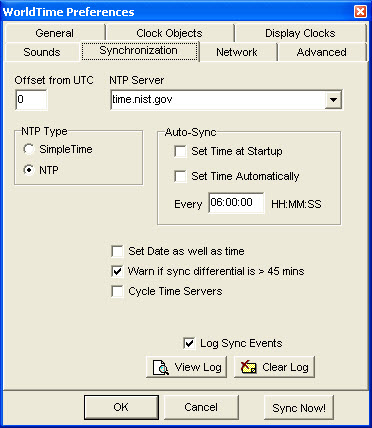
Months ago it just stoped syncing. I got it to sync to the computer time at startup. At times World Time syncs with the green check mark. What I did in Windows XP was to uncheck syncing at startup and time. On your next startup and world Time loads with the question mark after you have a connection. Maybe at times you will get what I get and World Time working fully! This program needs to be upgraded after years. Someone needs to fix the syncing because that is the cause of it not working right now. I think system upgrades are effecting this program from working like before? So look at the picture, are your settings the same?
 |
|
by: paulg March 19th, 2010 |
i have tried every sync in it cannot get it to sync anymore. please help!
Have you tried running WorldTime As Administrator? I am running Vista 64 and had to start running WorldTime As Administrator some time in the past when it stopped syncing with the standard user account. There could also be a problem with the local policy setting "Local Policies/User Rights Assignments/Change System Time". In my case adding my standard user account to this policy does not let me sync WorldTime in that account.
|
|
by: quietstormx March 7th, 2010 |
i have tried every sync in it cannot get it to sync anymore. please help!
It has something to do when it tries to sync. Something is wrong with syncing. Unselect syncing on startup and at a specific time, unselect both check boxed if checked. In the settings! Untill this is updated?
|
| RSS feed | Feed Description |
|---|---|
 Full RSS feed Full RSS feed |
Complete RSS feed |
| WorldTime Support |
RSS feed for: WorldTime Support |
| A Rich Site Summary (RSS) feed is an xml data file that provides a summary of the information contained here. It is not designed to be viewed in your browser, but instead by rss reader software. If you do not know what this means - you can safely ignore it, as it is provided for advanced users with rss reader software only. | |
i
To contribute to our forums you must login. New members can register for a user account.