


PawPrint.net Forum
Thread #917
 by: sbaker December 26th, 2009 |
WorldTime on Windows 7
WorldTime was designed to run on Windows 98/2000/XP and not under the more restrictive Windows Vista/7 environments, however you can install it there by following this process:
Windows 7/64 (what I use) tested: 1) Create a directory on C: for WorldTime (outside the protected Program Files folders) I use C:PawPrint 2) run the install and click Advanced Options set the install directory to that folder 3) Un-check the creation of a program group for WorldTime 4) Click "Go" 5) Run WorldTime and go to the prefs - correct the locations of the sounds by browsing to those files in the preferences (in my example they will be in C:PawPrintWorldTimesounds This configuration is working for me.  --
Fair Winds, and watch for squalls from leeward. |
Discussion:
 by: kenwa August 11th, 2015 |
WorldTime on Windows 7
I could not 6.x to work, even in a separate folder. However, I tried version 5.x and it worked without any problems.
|
|
by: gerry August 10th, 2015 |
WorldTime on Windows 7
I am sorry that this is very late coming; however, I have been using WT 5.5.2.478 following its default installation processes with Windows 7 Starter (32 bit) and Windows Home Premium (64 bit) without any problems whatsoever. Conversely, WT 6.0.0.941 just did not look or feel right in comparison to version 5...and personally did not like it (loved version 5).
In next few days, I am going to try installing Version 5 on Windows 10. I originally started to perform a Windows 7 to Windows 10 upgrade, negating that requirement; however, I ended up performing a clean install to rid myself of constant restarts. It turned out that Comodo Firewall (supposedly since updated) was the cause of that nightmare; anyhow, I now have a much faster running machine thanks to removing all of the bloat--but I digress. Hopefully, we'll be able to start a successful Windows 10 installation topic. |
|
by: mark@markssanders.co March 9th, 2013 |
WorldTime on Windows 8?
I've thoroughly enjoyed the worldtime clock on my XP, Vista & Win7 laptops for years. By chance is there a way to either successfully install it on Windows 8?
Mark |
|
by: kenwa January 10th, 2013 |
WorldTime on Windows 7
Thank you Scott for your advice on running World Time on Windows 7/64. I have installed the program on C:PawPrint, set it to run under XP and as Administrator. The program loads and I can see all my clocks displayed but the whole thing is locked up. Task Manager shows World Time as running and 1145h46ZUTC as 'not responding'. Ending this process closes World Time as well. So I seem to have the program but cannot really use anything other than seeing the time in the various places I have set up.
I cannot find this process anywhere in the World Time folder so I cannot investigate any further. Can you identify this and, hopefully, describe a workaround to free up the clocks and menus. I am also a bit at sea regarding the fix for synchronisation. Can someone define the exact entry in the Hosts file? Thanking you all in anticipation. |
 by: sparky December 30th, 2012 |
WorldTime on Windows 7
Aaaargh
Sadly, once the Picture uploads, the Post self-completes, and I surely don't need to make 12 more posts, with a single .jpg picture in each..... So, this time I shall Upload a .rar (WinRAR Zip File) with all the settings for WorldTime Clock Screengrabs as they work here. Aaaarrrggghhh - Sadly, that multi-picture choice is not available to me in this Forum. Send me your direct Email address via text to me on my NZ Cellphone as below Zero-two-seven-two-two-two-zero-eight-eight-two Then I shall send you a winRAR file with the 13 screengrab .jpg pictures, showing all my settings which do work OK, except for most of the Sounds as listed in my earlier Post. Happy New Year to you. Kind regards to all sparky |
|
by: sparky December 30th, 2012 |
WorldTime on Windows 7
Hello waiguoguizi and other readers
Further to my earlier post, I use as the main Security Utility Emsisoft AntiMalware from " title="Link to http://www.emsisoft.co.nz/en/][/url]" class="newWindow">http://www.emsisoft.co.nz/en/][/url] The World Time Clock does need to be installed as an "Administrator" (Right click on the file and "Run as Administrator. 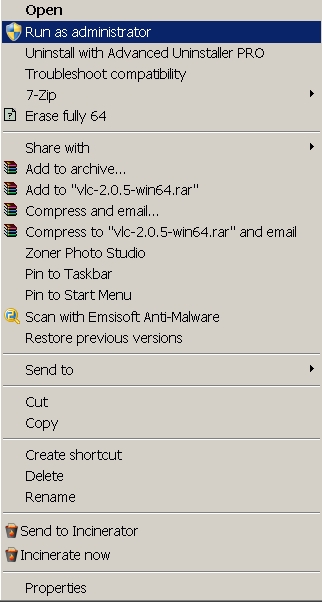 |
 by: waiguoguizi December 30th, 2012 |
Getting Synchronization to Work in WorldTime on Windows 7
Thank you sparky and Scott. With the aid of sparky's post of December 29, 2012, and of Scott's original post, I was able to install WorldTime beta 6.0.0.941 under 64-bit Windows 7 Ultimate with SP1 and all Micro$oft Windows updates.
However, synchronization always fails. sparky, you wrote 'Synchronisation was enabled by adding an exception in the "Hosts File."' Did this mean that, in Windows' "hosts" file you redefined the ip addresses of the NTP server names given in the synchronization tab of WT's preferences? Thanks again from another Kiwi, --
Wellington, New Zealand |
|
by: sparky December 29th, 2012 |
WorldTime on Windows 7
I used WorldTime on different PC's over the years.
Now have Win7 64bit ultimate with Service Pack 1 and all updates to date on the PC. After reading posts, have installed the WorldTime v6.0.0.941 to a PAWPRINT Folder on HDD Drive C: This is the same as I've had to install Pegasus Email Client - Outside the Windows 7Default "Program Files" also "Program Files (X86)" Folders. So the Extract and install Path is: C:PAWPRINT This sets up a further Folder of "WorldTime" inside the PAWPRINT Folder, showing now as: C:PAWPRINTWorldTime. Synchronisation was enabled by adding an exception in the "Hosts File" also "Application Rules" of our Security Software here. Extra clocks were easily added, thankyou. So, All the Sounds in the "Sounds" directory do work OK if directly clicked on in the WorldTimeSounds folder. However, many of the sounds in the WorldTime clock do sound like a short chirp - That is the "PC's Default warning chirp". The following as heard in the WorldTime Clock sound like that chirp; soundsshipsbell.wav soundsbigben.wav The 4 Alarm sounds as below: soundsmajor.wav soundsnormal.wav soundsminorwav soundstimer.wav The 3 Synch sounds as below: soundsattempt.wav soundssuccesswav soundsfail.wav The 4 Chime sounds below do work just fine - Hurrah !!!: soundswchimes60.wav soundswchimes30.wav soundswchimes15.wav soundswchimes45.wav So, the melodious sounds of the quarter, half, three-quarter, and hour do work properly - Ah - some success there, and so wonderful to hear, that's to be sure. I have tried copying the bigben.wav file to the Windows Directory, and setting the path in WorldTime to that copied .wav file - No success - They don't play from WorldTime Clock itself, just the "PC default warning Chirp". Likewise the other improperly playing sounds above, all have the same problem: No matter where they are copied to, and that new path set, they don't work from WorldTime Clock. My conclusion is that the 4 Chime sounds that do actually work, must have a slightly different software path in the WorldTime Clock to enable them to work properly. The other sounds, sadly, just play the internal PC "warning" chirp, and thus users miss out on the richness of the variety of WorldTime Clock sounds. After trying for some time, I have, of course, deleted all the copied .wav files which were used in my testing. Thanks Scott for what does actually does work: The Clock and the 4 Chime sounds. Cheers from New Zealand. Happy New Year for 2013 to all readers. |
|
by: mick March 3rd, 2012 |
WorldTime on Windows 7
I am using World Time 5 on both Win 7 and Win XP. Up until I came across this forum I couldn´t understand why some changes I made saved but others didn´t. I now realise that it was an operating system issue and that changes I made on the Win XP computer saved but not on the Win 7 computer. As I moved the program back and forth between the computers depending on what was being used it is now apparant that the changes I made on the Win XP computer were the ones that were retained. So my problem is solved even if in a round about fashion. I can live with this as I find World Time a very useful tool.
|
 by: mikewonaus December 27th, 2011 |
WorldTime on Windows 7
AlohaFromFlynnsBeachpark! ~0845hrs~Wed, Dec 28th, ´11
Wonder if the YahooWidgets would help? There´s gotta be a hunerd of em & yeah, I liked the Qlock too but enjoy the images & audio effects of the widgets. Thanks for the feedback & Happy New Year!  |
|
by: pscheuer December 27th, 2011 |
WorldTime on Windows 7
Mike, thanks. These look great if one is looking for a web-based WT clock.
I´m actually looking for something standalone, with tools like WT6. I´m hoping some will figure-out what is preventing it from running on Win 7 64-bit. Qlock isn´t bad, bu the GUI is not as flexible as WT6 and there´s no time calculator. FYI: if you´re running win 7, you can always install the XP virtual machine (VM) and run WT6 in the XP VM desktop but of course, it´s not as convenient as being able to tun it from the system tray. |
|
by: mikewonaus December 23rd, 2011 |
WorldTime on Windows 7
http://24timezones.com/
http://www.timeanddate.com/worldclock/personal.html These are two of the useful clocks as alternatives to ´World Time´ for any operating system! Merry Christmas! 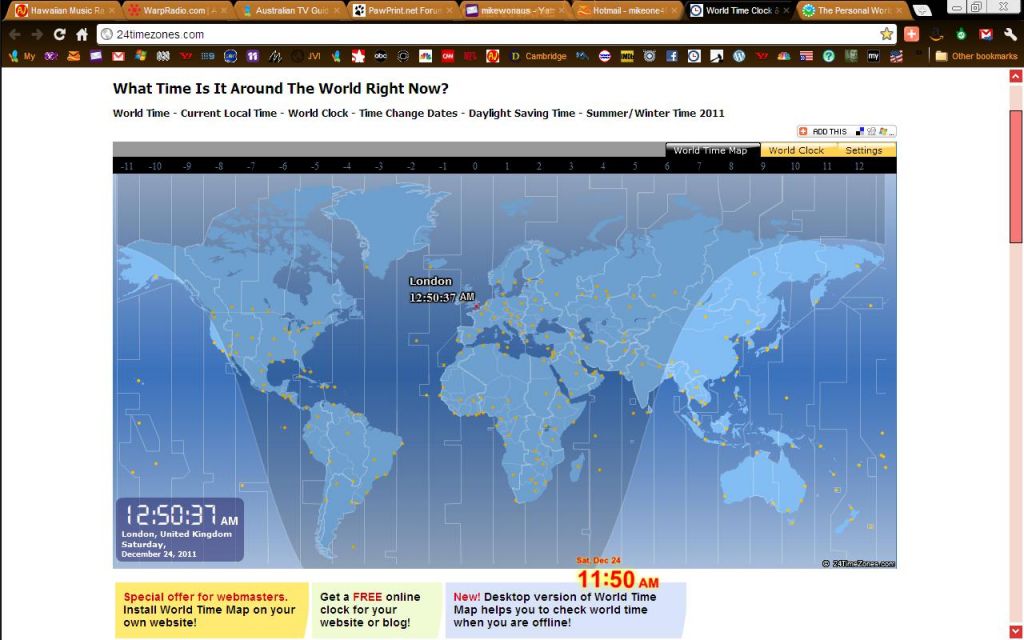 |
|
by: pscheuer December 23rd, 2011 |
WorldTime on Windows 7
As of this past week, on Windows 7 64-bit, Sp2, WT (latest version) launches, but freezes completely as soon as it appears on my desktop.
even after uninstalling and following the reinstall instructions above...maybe some new MS patch is causing it to crash? Oddly, the tools DST manager and stopwatch, when launched from: Start->Programs_>Pawpawprint work! Any suggestions on what to try next to get the main program to stay running in win 7 64 bit. PS: the only worldclock app that comes close to worldclock´s great interface & tool set is QLOCK. However, QLOCK has no time calculator the alarms are limited to 5 per clock To get the alarm feature you must upgrade to pro ($15) |
|
by: pscheuer December 23rd, 2011 |
WorldTime on Windows 7
As of this past week, on Windows 7 64-bit, Sp2, WT (latest version) launches, but freezes completely as soon as it appears on my desktop.
even after uninstalling and following the reinstall instructions above...maybe some new MS patch is causing it to crash? Oddly, the tools DST manager and stopwatch, when launched from: Start->Programs_>Pawpawprint work! Any suggestions on what to try next to get the main program to stay running in win 7 64 bit. PS: the only worldclock app that comes close to worldclock´s great interface & tool set is QLOCK. However, QLOCK has no time calculator the alarms are limited to 5 per clock To get the alarm feature you must upgrade to pro ($15) |
|
by: mikecq June 13th, 2011 |
WorldTime on Windows 7
I installed this on Win7 64bit and it seems to work fine.. The font resize does not seem to work.
|
|
by: mikecq June 13th, 2011 |
WorldTime on Windows 7
I installed this on Win7 64bit and it seems to work fine.. The font resize does not seem to work.
|
|
by: mikecq June 13th, 2011 |
WorldTime on Windows 7
Great clock.
The font size change does not seem to work. Mexico has 3 time zones.. http://www.timetemperature.com/tzmx/mexico_time_zone.shtml |
|
by: waiguoguizi April 14th, 2011 |
WorldTime on Windows 7
Hi, Scott,
I´m going to try installing WT under Win7/64 in a directory I created at C:PawPrint. 1) Do you recommend installing WT version 6.0.0.941 beta, rather than 5.5.2.748? 2) In your post of April 12th, 2011, you said that the problem was that WT was trying to update its .conf file in the directory where it is installed and that Win7 does not allow that. In my case, the installation directory will be C:PawPrint, per your post of December 26th, 2009. Is Win7 going to refuse to allow WT to update its .conf file in that directory? 3) If the answer to question 2) is, "Yes, Win7 will not allow WT to update its .conf file in directory C:PawPrint", how do I get around this? Is there some way for me to move the .conf file -- and any other configuration files, such as the DST file -- to a drive other than the C: drive, where Win7 will allow WT to update them? 4) In my case, Win7/64 is installed on a virtual machine running under Parallels Desktop for Mac. My user files are stored on the Mac´s hard drive, which looks to the Win7 virtual machine like mapped drive Y: on a network called psf. Might I get around the Win7 protection problem by creating a directory called Y:PawPrint and installing WT there? 5) Have you been able to synchronize WT with time servers on your installation under Win7/64? It´s been years since I last ran WT. At that time, I could no longer get WT to sync with time servers. Thanks in advance for your reply, Waiguo Guizi --
Wellington, New Zealand |
|
by: sbaker April 12th, 2011 |
WorldTime on Windows 7
The problem with WT in Win7 is Windows new "security" on the Program Files folder. WorldTime was initially built for Win2K and WinXP where this wasn´t an issue and I actually made the conscious decision NOT to use the Windows Registry to prevent bloating up people´s computers and instead used a .conf file - more like the way programs work on Linux systems.
In retrospect this probably was a bad decision despite seeming like a good one at the time. That said, it should be fairly easy to get WT working just fine in Win 7 provided you take one of several different tacks for the way it is installed. Because I see q few people really trying to get that happening I´ll take some time to run through a step by step of how to install WT in Win7 and post the details here as soon as I have that. The problem is that it´s trying to update a .conf file in it´s install folder and Windows is not allowing that - this leads to a whole host of issues. Running it as Administrator may fix it - but that´s a kludge - I´ll work out a better solution (most likely installing it somewhere OTHER then Program Files) and get back to you. --
Fair Winds, and watch for squalls from leeward. |
|
by: bardsidhe April 12th, 2011 |
WorldTime on Windows 7
Thank You, I used to rely so heavily on this Application, now after years of trying to find it again (mostly through my boxes of what others would call junk) I finally found it here online, and it´s at version 6,
is there likely to be a version of this made for Win7 or should I just run win98/me in a Virtual system? I will do what ever it takes to keep this program as part of my online experience. |
| RSS feed | Feed Description |
|---|---|
 Full RSS feed Full RSS feed |
Complete RSS feed |
| WorldTime Support |
RSS feed for: WorldTime Support |
| A Rich Site Summary (RSS) feed is an xml data file that provides a summary of the information contained here. It is not designed to be viewed in your browser, but instead by rss reader software. If you do not know what this means - you can safely ignore it, as it is provided for advanced users with rss reader software only. | |
i
To contribute to our forums you must login. New members can register for a user account.